FlickrMovr
- Breadcrumbs
- Posted at 2010-03-18 04:45 UTC / (5,165 days ago)
- 1 Comment
- Show map of post
Hi folks,
I found some time and developed an extended version of FlickrMovr which is my contribution to the flickr app garden.
The main aim of this project, which I completely developed as php-script, is to provide a backup solution for your flickr photos including the related meta-data. Personally I use it to ease my flickr photo-lifecycle.
FlickrMovr’s main-features:
- Downloads photos and thumbnails of your flickr-photos and copies these files into directories named after your flickr-sets
- Creates an XML-database with your flickr meta-data like set-title, set-description, photo-title, photo-description, location (GPS-coordinates), tags, date-taken, …
- Uses ExifTool by Phil Harvey to write your flickr meta-data into your jpgs exif-tags
All the mentioned features are optional. In other words, if you don’t want to download your photos and just store the meta-tags in a XML ‘database’, that’s also fine. – For all of you that I heard screaming out load, when I used the term XML database instead of XML file: I know that the term XML database describes a different technology, but I use the term intentionally to avoid confusion for non-geeks…
By using the XML database FlickrMovr is able to conduct an incremental backup after your first complete backup of your photos’ meta-data and therefore saves a lot of time and bandwidth.
In addition, together with Niki, I’ve developed a basic XSL-file which can be used to automatically transform the created XML into an XHTML-file. In other words, you can use your XML database to view your photos and meta-tags in any modern browser.
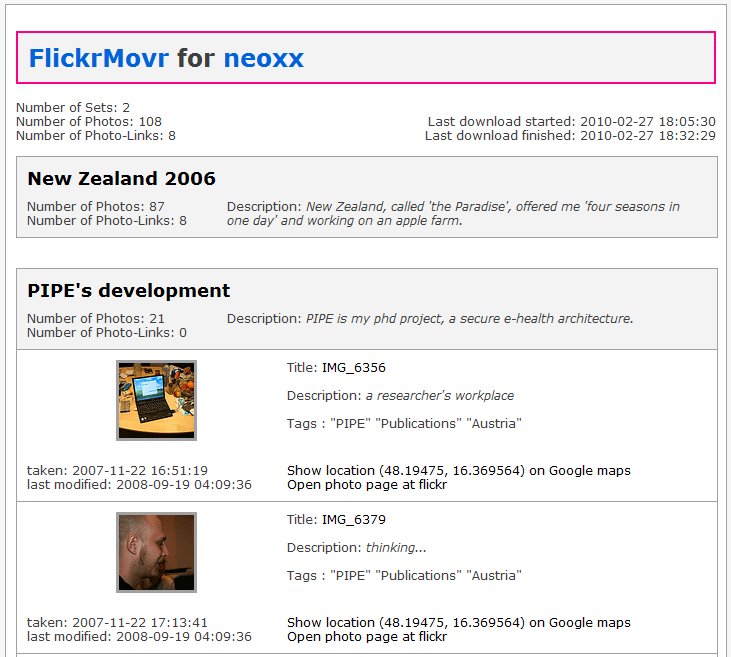
my first contribution to the flickr app garden
If you have certain photos in more than one set, these photos will be copied into each of the assigned sets. In FlickrMovr’s XML database, each photo will be included only once, whereas its occurrence in additional sets will be reflected by so-called photo_links.
Instructions
As FlickrMovr is written in php you need to download and install a current version of php. Edit 2016-11-14: FlickrMovr can be downloaded by the usage of a SVN client, which eases automatic updates and saves a few clicks on downloads. For windows I recommend the usage of TortoiseSVN. A comparison of available SVN clients can be retrieved from Wikipedia.
After the installation you need to edit config.php and fill in your flickr user-name and a flickr API-key which can be generated for free. A detailed description of all options can be found directly in config.php.
Afterwards just execute the following statement.
php -f flickrmovr.phpRemarks
It would also be possible to include FlickrMovr on a webserver, but due to browser time-outs I do not recommend using it in a browser-based environment.
If you remove one of your photos on flickr, FlickrMovr won’t automatically delete it from your hard-drive. In other words, you will still have a backup. This feature may be implemented in future versions.
Talking about versions, FlickrMovr is still in its Beta-phase, open source and licensed under GPL. – Feedback, bug-reports, etc. are warmly welcome. In the beta-phase, every user has to get his/her own API-key.
Please stick to the flickr community guidelines. If you want to support my work, you can buy me a pizza.
Greetz,
Berny
One Response to “FlickrMovr”
 says:
says:
| 3,462 days ago
FlickrMovr v0.60 is a major relaunch which includes switching to the OAuth protocol. My implementation uses the php-library DPZFlickr by David Wilkinson (dopiaza).
Besides of that, this update allows more flexibility as the config.php-file may be moved to a different location: Now you can use the same code-base with more than one config-file.
This version is the direct successor of v0.51 which changed the default transport-protocol to https earlier this year.

Leave a Reply
You must be logged in to post a comment.